

Posted on October 2, 2006
Introduction
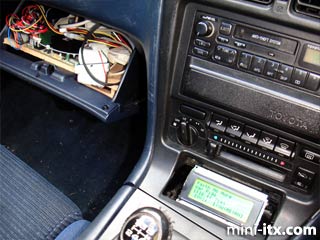
Current head units while starting to support USB drives and MP3/WMA files have a few drawbacks - firstly there a limits on the number of files that can be accessed by various media, secondly they are painfully slow loading files, and thirdly they are yet to support lossless music files (excluding the Phatnoise Phatbox). My aim was to produce a music player capable of playing both lossy (MP3/WMA/etc) and lossless media (FLAC/APE/WAV) for the price of a cheap headunit.
Things high on my list were a fast loading time, fast song change time and low resource requirements. Low on the list were a fancy colour screen, touchscreen, etc.
Software
My first task was to find any software capable of undertaking this task. After playing with varying versions of Windows, ignoring Linux as I'm not capable of a well stripped down install, and ignoring BeOS/Zeta due to possible hardware compatability issues, I came to DOS (MS-DOS, DR-DOS, FreeDOS, they are all pretty much identical). In DOS I had an operating system with a fast boot time, practically zero resource overheads, and is damn easy to use.
The downside of DOS was the realisation of "Where the hell am I going to find a modern media player for it?" After painstaking browsing I finally happened across a website linking to the strangely titled application - MPXPLAY. Looking at the features it supported all the files I was interested in:
• AAC (Advanced Audio Coding from http://www.audiocoding.com (in RAW/ADTS/ADIF fileformats))
• MP4/M4A (MPEG4 container (only AAC in MP4 is supported))
• AC3 (Dolby AC3 from http://ess.engr.uvic.ca/~aholtzma/ac3 and http://www.dolby.com)
• APE (Monkey's Audio from http://www.monkeysaudio.com)
• DTS (Digital Theatre Systems from http://www.videolan.org/dtsdec.html)
• FLAC (Free Lossless Audio Codec by http://flac.sourceforge.net and http://ffmpeg.sourceforge.net)
• MP2,MP3 (Audio MPEG Layer II/III from http://www.mpg123.de)
• MPC (MPEGPlus/MusePack from http://www.uni-jena.de/~pfk/mpp)
• OGG (Ogg Vorbis from http://www.xiph.org)
• WAV (uncompressed wave files)
• CDW (Audio-CD 'ripp and play' on the fly)
It also supported many types of playlist. The next thing to grab me on the spec list was the support for LCDs. Not the 7" colour screen type, but the old fashioned text mode type with the dot-matrix style makeup. The price difference between a modest colour screen and one of these old style LCDs was around £100 so there was a major saving. Another advantage was the system requirement list for various files: MP3 playback only required a 486, and the most system intensive files, DTS, only required a Pentium II - opening up the avenue of using cheap hardware. While the list of supported soundcards was limited it claimed to support anything SoundBlaster Pro compatible, which most cards are.
To enable MPXPLAY to display long file names, DOSLFN was used.
Hardware
The next stage was to procure hardware. While my first plan was to use an old Pentium 200MMX motherboard and CPU I had laying around alongside a SoundBlaster AWE32 soundcard, I soon ran into difficulties what with them being too large to feasibly fit into my Toyota MR2. I needed a small motherboard and I wanted it to be cheap!
The answer was the VIA EPIA 5000 motherboard running a 533 MHz Eden CPU. It was easily up to the job at hand while only measuring 17cm x 17cm x 4.5cm - small enough to fit into the DIN slot in a car. While hardly a powerful machine it was more than up to the task at hand. I needed memory for it which came in the form of an old 128MB stick of SDRAM I had lying around.
After the hardware to run the software I needed a power supply for it. While it's possible to use a 12V-240V inverter and a normal PC PSU it's incredibly wasteful of space in the car, and is generally frowned upon electrically. The solution there came in the form of the M1-ATX PSU, it only weighs in at 90W but that's enough to power the motherboard, and a couple of regular PC hard drives, or a couple of laptop hard-drives and a laptop CD drive.
To store the music I needed a hard drive, so I purchased a 40GB laptop drive with an adaptor to use it with a regular pc.
Finally I got the screen, it's an inexpensive Hitachi HD44780 based screen that runs from the parallel port on the motherboard and features a 20 character wide, 4 line display.
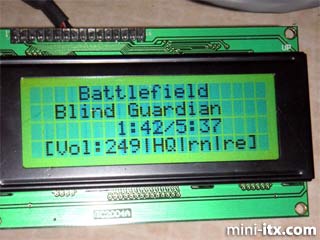
All in all the raw parts cost weighed in around £170.
Construction
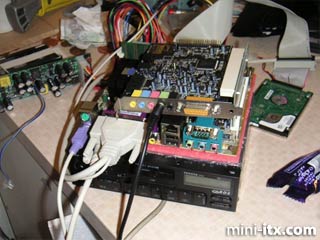
Assembling the parts was easy. The power supply itself takes a live, ground and ignition feed from the car to run, and it gives a remote out when it is on. The PSU connects to the motherboard via a regular ATX power lead and there are a set of jumpers that can be connected to the motherboard's power switch pins that allows the PSU to turn the PC on and off.
Once assembled the hard drive was put into my desktop PC where it was formatted as FAT32 and MS-DOS 6.22, DOSLFN and MPXPLAY were installed. The mpxplay.ini and autoexec.bat files were configured (explained later) and saved on the drive. Then music files were copied across. Once complete the hard drive was put on the rig and it was test booted from a car battery, whereupon all worked fine. At this stage I was using a keyboard to control the software, and was testing compatability with a SoundBlaster Live card.
 |
 |
 |
Quick Links
Mailing Lists:
Mini-ITX Store
Projects:
Show Random
Accordion-ITX
Aircraft Carrier
Ambulator 1
AMD Case
Ammo Box
Ammo Tux
AmmoLAN
amPC
Animal SNES
Atari 800 ITX
Attache Server
Aunt Hagar's Mini-ITX
Bantam PC
BBC ITX B
Bender PC
Biscuit Tin PC
Blue Plate
BlueBox
BMW PC
Borg Appliance
Briefcase PC
Bubbacomp
C1541 Disk Drive
C64 @ 933MHz
CardboardCube
CAUV 2008
CBM ITX-64
Coelacanth-PC
Cool Cube
Deco Box
Devilcat
DOS Head Unit
Dreamcast PC
E.T.PC
Eden VAX
EdenStation IPX
Encyclomedia
Falcon-ITX
Florian
Frame
FS-RouterSwitch
G4 Cube PC
GasCan PC
Gingerbread
Gramaphone-ITX-HD
GTA-PC
Guitar PC
Guitar Workstation
Gumball PC
Hirschmann
HTPC
HTPC2
Humidor 64
Humidor CL
Humidor II
Humidor M
Humidor PC
Humidor V
I.C.E. Unit
i64XBOX
i-EPIA
iGrill
ITX Helmet
ITX TV
ITX-Laptop
Jeannie
Jukebox ITX
KiSA 444
K'nex ITX
Leela PC
Lego 0933 PC
Legobox
Log Cabin PC
Lunchbox PC
Mac-ITX
Manga Doll
Mantle Radio
Mediabox
Mega-ITX
Micro TV
Mini Falcon
Mini Mesh Box
Mini-Cluster
Mobile-BlackBox
Moo Cow Moo
Mr OMNI
NAS4Free
NESPC
OpenELEC
Osh Kosh
Pet ITX
Pictureframe PC
Playstation 2 PC
Playstation PC
Project NFF
PSU PC
Quiet Cubid
R2D2PC
Racing The Light
RadioSphere
Restomod TV
Robotica 2003
Rundfunker
SaturnPC
S-CUBE
SEGA-ITX
SpaceCase
SpacePanel
Spartan Bluebird
Spider Case
Supra-Server
Teddybear
Telefunken 2003
TERA-ITX
The Clock
ToAsTOr
Tortoise Beetle
Tux Server
Underwood No.5
Waffle Iron PC
Windows XP Box
Wraith SE/30
XBMC-ION